Basic React
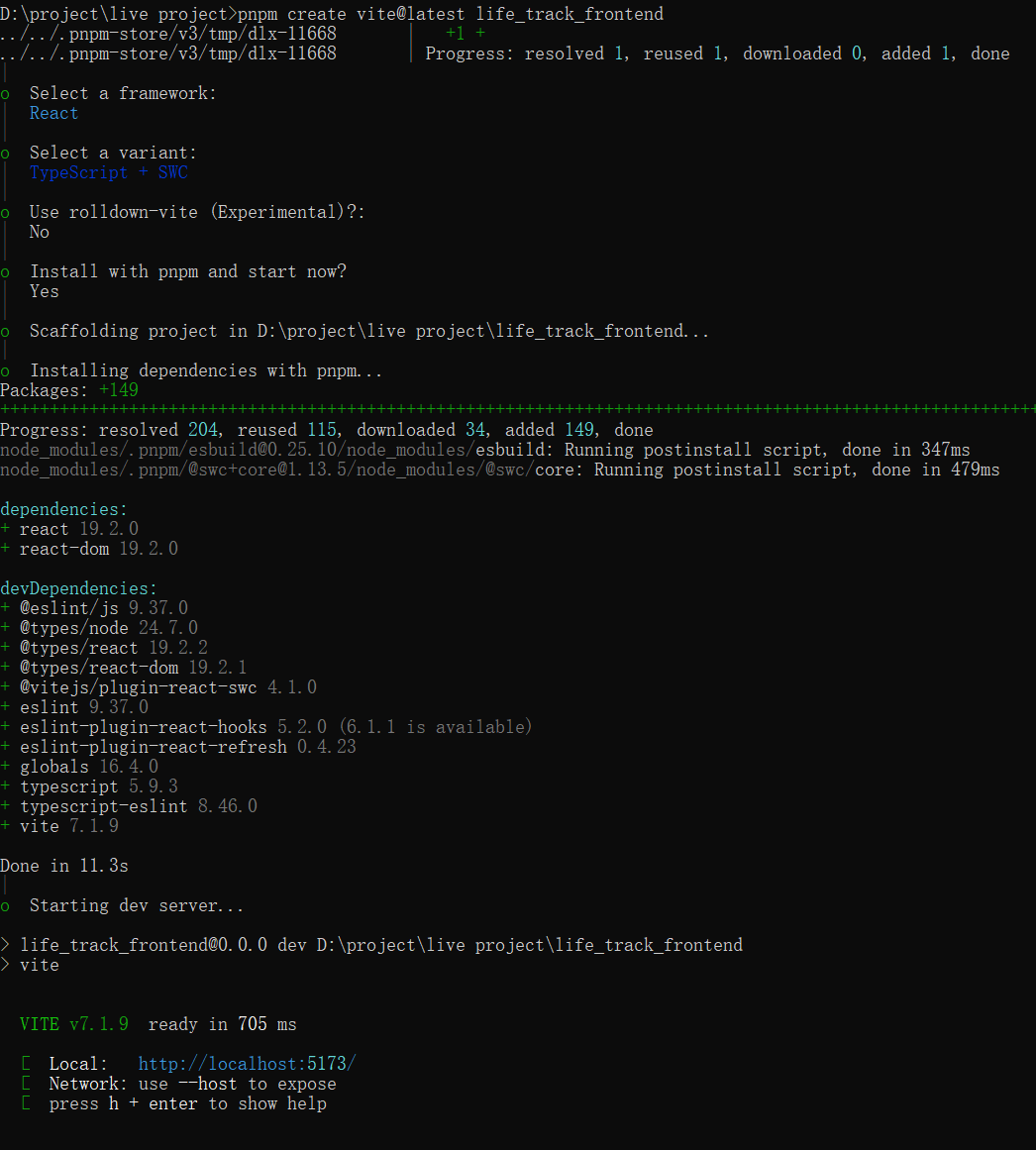
新建react项目
npm create vite@latest my-react-app

cd my-react-app
npm install
npm run dev
spread and destruturing array or object
- spread array
const arr = [1, 2, 3];
const copy = [...arr];
console.log(copy); // [1, 2, 3]
- spread object
const obj = { a: 1, b: 2 };
const copy = { ...obj };
console.log(copy); // { a: 1, b: 2 }
- array destruturing
const [a, b] = [10, 20];
console.log(a); // 10
console.log(b); // 20
- object destruturing
const person = { name: "Alice", age: 25 };
const { name, age } = person;
console.log(name, age); // Alice 25
Updating a nested object
consider the object construct like this,
const [person, setPerson] = useState({
  name: 'Niki de Saint Phalle',
  artwork: {
    title: 'Blue Nana',
    city: 'Hamburg',
    image: 'https://i.imgur.com/Sd1AgUOm.jpg',
  }
});
you can update immutable object like this way,
const nextArtwork = { ...person.artwork, city: 'New Delhi' };
const nextPerson = { ...person, artwork: nextArtwork };
setPerson(nextPerson);
or
setPerson({
  ...person, // Copy other fields
  artwork: { // but replace the artwork
    ...person.artwork, // with the same one
    city: 'New Delhi' // but in New Delhi!
  }
});
or use useImmer instead of useState
another way you can use
use-immerlibrary, handle deeper nested object.
  const [person, updatePerson] = useImmer({
    name: 'Niki de Saint Phalle',
    artwork: {
      title: 'Blue Nana',
      city: 'Hamburg',
      image: 'https://i.imgur.com/Sd1AgUOm.jpg',
    }
  });

  function handleNameChange(e) {
    updatePerson(draft => {
      draft.name = e.target.value;
    });
  }
箭头函数
| 写法 | 含义 | 是否需要写 return |
|---|---|---|
(param) => ( expression ) | 隐式返回,自动返回括号里的表达式结果 | ❌ 不需要 |
(param) => { statement } | 函数体语句块,不会自动返回,需要手动写 return | ✅ 需要 |
react数据遍历指定key
key 只能用在 父组件 map 渲染列表的元素上,而不是子组件内部。
export default function Contact({
  img,
  imgAlt,
  name,
  phoneNumber,
  email,
}: ContactInfo) {
  return (
    //这是 不对的,因为 key 只能用在 父组件 map
    // 渲染列表的元素上,而不是子组件内部。
    // <article className="contact-card" key={id}>
    <article className="contact-card">
      <img src={img} alt={imgAlt} />
      <h3>{name}</h3>
      <div className="info-group">
        <img src={phoneIcon} alt="phone icon" />
        <p>{phoneNumber}</p>
      </div>
      <div className="info-group">
        <img src={mailIcon} alt="mail icon" />
        <p>{email}</p>
      </div>
    </article>
  );
}
function App() {
  return (
    <div className="contacts">
      {contacts.map((contact) => (
        <Contact key={contact.id} {...contact} />
      ))}
    </div>
  );
}
向react组件传递参数
import phoneIcon from "./images/phone-icon.png";
import mailIcon from "./images/mail-icon.png";
import type ContactInfo from "./ContactInfo";

export default function Contact({
  img,
  imgAlt,
  name,
  phoneNumber,
  email,
}: ContactInfo) {
  return (
    //这是 不对的,因为 key 只能用在 父组件 map 渲染列表的元素上,而不是子组件内部。
    // <article className="contact-card" key={id}>
    <article className="contact-card">
      <img src={img} alt={imgAlt} />
      <h3>{name}</h3>
      <div className="info-group">
        <img src={phoneIcon} alt="phone icon" />
        <p>{phoneNumber}</p>
      </div>
      <div className="info-group">
        <img src={mailIcon} alt="mail icon" />
        <p>{email}</p>
      </div>
    </article>
  );
}
import "./index.css";
import Contact from "./Contact";
import { contacts } from "./ContactInfo";
function App() {
  return (
    <div className="contacts">
      {contacts.map((contact) => (
        <Contact key={contact.id} {...contact} />
      ))}
    </div>
  );
}
export default App;
useState function
import { useState } from "react";

export default function Main() {
  // Array destructuring
  const [ingredients, setIngredients] = useState<string[]>([
    "Chicken",
    "Oregano",
    "Tomatoes",
  ]);
  const handleSubmit: React.FormEventHandler<HTMLFormElement> = (event) => {
    event.preventDefault();
    const formData = new FormData(event.currentTarget);
    // the key is the name of input
    const newIngredient = formData.get("ingredient");
    if (typeof newIngredient === "string" && newIngredient?.trim() !== "") {
      setIngredients((prev) => [...prev, newIngredient]);
    } else {
      console.warn("No ingredient provided");
    }
  };

  return (
    <main>
      <form className="add-ingredient-form" onSubmit={handleSubmit}>
        <input
          type="text"
          name="ingredient"
          aria-label="Add ingredient"
          placeholder="e.g. oregano"
        ></input>
        <button>Add ingredient</button>
      </form>
      <h1>Ingrredients on hand:</h1>
      <ul className="ingredient-ul">
        {ingredients.map((ingredient) => (
          <li key={ingredient}>{ingredient}</li>
        ))}
      </ul>
    </main>
  );
}
onClick传值函数名or匿名函数
Version 1 (onClick={getRecipe})
You’re giving React a function reference. React will call getRecipe() only when the button is clicked.
This is the simplest and most efficient form — no new function is created on every render.
Version 2 (onClick={() => getRecipe()})
You’re creating a new anonymous function on each render that calls getRecipe() inside it.
It still works — React will call your wrapper function on click, which in turn calls getRecipe() — but it’s one extra layer of indirection and (very slightly) less efficient.
| Code | When to use | Notes |
|---|---|---|
onClick={changeToHeld} | Default, most common,or closure function | Pass function directly |
onClick={() => changeToHeld(id)} | When you need to wrap logic or pass arguments | Creates a new function every render |
pass parameter function
import React, { useState } from "react";
import "./index.css";
import Die from "./Die";
import { nanoid } from "nanoid/non-secure";

export interface DiceProp {
  value: number;
  isHeld: boolean;
  id: string;
}

const App: React.FC = () => {
  const generateDice = () =>
    Array.from({ length: 10 }, () => ({
      value: Math.ceil(Math.random() * 6),
      isHeld: false,
      id: nanoid(),
    }));
  const [dice, setDice] = useState<DiceProp[]>(generateDice());
  const changeToHeld = (id: string) =>
    setDice((prevDice) =>
      prevDice.map((die) => (die.id === id ? { ...die, isHeld: true } : die))
    );
  const diceElements = dice.map((diceProp) => (
    <Die key={diceProp.id} changeToHeld={changeToHeld} die={diceProp} />
  ));

  const rollDice = () => {
    setDice(generateDice());
  };

  return (
    <main>
      <div className="dice-container">{diceElements}</div>
      <button className="roll-button" onClick={rollDice}>
        Roll
      </button>
    </main>
  );
};

export default App;
import type { DiceProp } from "./App";

/**
 * Recommendation
 * For scalable apps / larger state management: Option 1 is preferred
 * because it separates state (data) from behavior (actions), which aligns with React best practices.
 */
const Die: React.FC<{ die: DiceProp; changeToHeld: (id: string) => void }> = ({
  die,
  changeToHeld,
}) => {
  const { value, isHeld, id } = die;
  return (
    <button
      className={isHeld ? "held" : "notHeld"}
      onClick={() => changeToHeld(id)}
    >
      {value}
    </button>
  );
};

export default Die;
pass a closure function
import React, { useState } from "react";
import "./index.css";
import Die from "./Die";
import { nanoid } from "nanoid/non-secure";

export interface DiceProp {
  value: number;
  isHeld: boolean;
  id: string;
}

const App: React.FC = () => {
  const generateDice = () =>
    Array.from({ length: 10 }, () => ({
      value: Math.ceil(Math.random() * 6),
      isHeld: false,
      id: nanoid(),
    }));
  const [dice, setDice] = useState<DiceProp[]>(generateDice());
  const changeToHeld = (id: string) =>
    setDice((prevDice) =>
      prevDice.map((die) => (die.id === id ? { ...die, isHeld: true } : die))
    );

  const diceElements = dice.map((diceProp) => (
    <Die
      key={diceProp.id}
      // closure function
      changeToHeld={() => changeToHeld(diceProp.id)}
      die={diceProp}
    />
  ));

  const rollDice = () => {
    setDice(generateDice());
  };

  return (
    <main>
      <div className="dice-container">{diceElements}</div>
      <button className="roll-button" onClick={rollDice}>
        Roll
      </button>
    </main>
  );
};

export default App;
import type { DiceProp } from "./App";

const Die: React.FC<{ die: DiceProp; changeToHeld: () => void }> = ({
  die,
  changeToHeld,
}) => {
  const { value, isHeld } = die;
  return (
    <button className={isHeld ? "held" : "notHeld"} onClick={changeToHeld}>
      {value}
    </button>
  );
};

export default Die;
如何动态设置变量名为key值
const handleChange = (event: React.ChangeEvent<HTMLInputElement>) => {
  const { name, value } = event.currentTarget;
  setMeme((prev) => ({ ...prev, name: value }));
};
const handleChange = (event: React.ChangeEvent<HTMLInputElement>) => {
  const { name, value } = event.currentTarget;
  setMeme((prev) => ({ ...prev, [name]: value }));
};
tsx能渲染的类型
React 的 JSX 表达式 { ... } 里,只能直接渲染以下类型:
- 字符串 (string)
- 数字 (number)
- 布尔值 (boolean)
- React 元素 (JSX 元素)
- 数组(包含以上类型)
- 不能渲染对象,对象数组
useEffect function
when calling useEffect, depends on the dependents in [].
That's look this example.
import React from "react";

export default function App() {
  const [starWarsData, setStarWarsData] = React.useState({});
  const [count, setCount] = React.useState(0);

  console.log("Rendered!");

  React.useEffect(() => {
    console.log("useEffect runs");
    fetch("https://swapi.dev/api/people/1")
      .then((res) => res.json())
      .then((data) => setStarWarsData(data)
      );
  }, [starWarsData]);

  return (
    <div>
      <h2>The count is {count}</h2>
      <button onClick={() => setCount((prevCount) => prevCount + 1)}>
        Add
      </button>
      <pre>{JSON.stringify(starWarsData, null, 2)}</pre>
    </div>
  );
}
Each time setStarWarsData(data) runs, React receives a new { ... } object.
Even if the JSON content is identical, it’s a different object reference,
so React thinks the dependency changed and re-runs the effect — causing an infinite loop.
corret usage
React.useEffect(() => {
  console.log("useEffect runs");
  fetch("https://swapi.dev/api/people/1")
    .then((res) => res.json())
    .then((data) =>
      setStarWarsData(data)
    );
}, []);
What happens when visit the page first time?
Rendered!
App.tsx:11 useEffect runs
App.tsx:8 Rendered!
| Stage | Trigger | What happens | Console output |
|---|---|---|---|
| 1 | Initial mount | Component function executes | Rendered! |
| 2 | After mount | useEffect callback runs | useEffect runs |
| 3 | State updated | Component re-renders with new data | Rendered! |
useRef
import { useRef } from "react";
export default function FocusInput() {
  const inputRef = useRef<HTMLInputElement>(null);

  const handleFocus = () => {
    // current 可能为 null,因此需要进行非空检查
    if (inputRef.current) {
      inputRef.current.focus();
    }
  };

  return (
    <div>
      <input ref={inputRef} type="text" placeholder="Click the button to focus me" />
      <button onClick={handleFocus}>Focus Input</button>
    </div>
  );
}
how to clean resouce in useEffect
import { useEffect, useState } from "react";

export default function WindowTracker() {
  const [windowWidth, setWindownWidth] = useState<number>(window.innerWidth);
  useEffect(() => {
    const watchWindowWidth = () => {
      console.log("resized!");
      setWindownWidth(window.innerWidth);
    };
    window.addEventListener("resize", watchWindowWidth);
    // cleaning up what creating before
    return () => {
      window.removeEventListener("resize", watchWindowWidth);
      console.log("cleaning up");
    };
  }, []);
  return <h1>Window width: {windowWidth}</h1>;
}
Array.from
// The _ means: “Ignore the element, just use the index.”
Array.from({ length: 3 }, (_, i) => i * 2);
// → [0, 2, 4]
当没有参数需要被使用时,使用不写参数.
Array.from({ length: 10 }, () => Math.ceil(Math.random() * 6))
Array.every
array.every(callback(element, index, array), thisArg?)
- with callback only
const threshold = { limit: 10 };
const numbers = [3, 5, 9];

// Arrow functions do NOT bind `this`, so `thisArg` is ignored.
const allBelowLimit = numbers.every((num) => num <br threshold.limit);

console.log(allBelowLimit); // true
- with callback and thisArg
const threshold = 5;
const numbers = [6, 7, 8, 9, 10];
const allAboveThreshold = numbers.every(function (num) {
  return num > this.threshold;
}, { threshold });
console.log(allAboveThreshold); // true
lazy Initialization for useState
1️⃣ Lazy initialization: useState(() => generateDice())
- Here, you pass a function to useState.
- React will call that function once — only on the initial render.
- The return value of the function becomes the initial state.
- After that, React never calls the function again, because it already has the state stored internally.
- Benefit: Useful when computing the initial state is expensive.
Explain:
- Component mounts → React calls () => generateDice().
- The return value (DiceProp[]) is stored as the state.
- Component re-renders → React reuses the stored state, function is never called again.
2️⃣ Non-lazy way:
const [dice, setDice] = useState(generateDice());
- Here, you call generateDice() immediately and pass its return value to useState.
- This happens every render of the component, but only the first value matters for initialization.
Explain:
- Component renders → generateDice() runs → returns array → React stores as state.
- Component re-renders later → generateDice() still runs, but React ignores it, because the state is already managed internally.
- Problem: If generateDice() is expensive, you waste CPU calling it unnecessarily on every render.
reusable routes
Xml
import { Route, Routes } from "react-router-dom";
import GamesId from "./GamesId";
import GameLayout from "./GameLayout";

// this contains links and routes
// 1. move all sub Route
// 2. wrapper all routes in to a "<Route element={<GameLayout />}></Route>"
// this part of code equivalent to "src/routes/v4/gameRoutes.tsx"
export default function GameRoutes() {
  return (
    <>
      {/* <GameLayout /> */}
      <Routes>
        <Route element={<GameLayout />}>
          <Route index element={<h1>Games</h1>}></Route>
          <Route path=":id" element={<GamesId />}></Route>
          <Route path="search" element={<h1>games search</h1>}></Route>
        </Route>
      </Routes>
    </>
  );
}
import { Link, Route, Routes } from "react-router-dom";
import NotFoundPage from "../other-function/NotFoundPage";
import GameRoutes from "./GameRoutes";
import GamesHome from "./GamesHome";

export default function App() {
  return (
    <>
      <nav
        style={{
          display: "flex",
          flexDirection: "column",
        }}
      >
        {/* if using replace here, backward will be two pages instead of one page */}
        <Link to="/" replace>
          home
        </Link>
        <Link to="/games">games</Link>
      </nav>
      <Routes>
        <Route path="/" element={<GamesHome />}></Route>
        {/* must "/*"" after "/games" */}
        <Route path="/games/*" element={<GameRoutes />}></Route>
        <Route path="*" element={<NotFoundPage />}></Route>
      </Routes>
    </>
  );
}
Json
import type { RouteObject } from "react-router-dom";
import GameLayout from "./GameLayout";
import GameItem from "./GameItem";
/**
 * reusable links and routes in gameRoutes,
 * - index
 * - index > {id}
 * - index > description
 */
const gameRoutes: RouteObject = {
  element: <GameLayout />,
  children: [
    { index: true, element: <h1>games</h1> },
    { path: ":id", element: <GameItem /> },
    {
      path: "description",
      element: (
        <p>
          PUBG is a last-player-standing shooter where up to 100 players
          parachute onto an island, scavenge for weapons and equipment, and
          fight to be the sole survivor. The playable area continuously shrinks
          throughout the match, forcing players into closer combat.
        </p>
      ),
    },
  ],
};

export default gameRoutes;
import type { RouteObject } from "react-router-dom";

import gameRoutes from "./gameRoutes";

// equivalent to <Routes>...</Routes>
export const routes: RouteObject[] = [
  {
    path: "/",
    element: <h1>home</h1>,
  },
  {
    path: "/games",
    // nested layout links here, need Layout inside of it.
    /* element: <GameLayout />,
    children: [
      { index: true, element: <h1>games</h1> },
      { path: ":id", element: <GameItem /> },
      { path: "search", element: <h1>games search</h1> },
    ], */
    // reuse code from gameRoutes
    ...gameRoutes,
  },
  {
    path: "/games1",
    ...gameRoutes,
  },
];
- 署名:在原有代码和衍生代码中,保留原作者署名及代码来源信息。
- 保留许可证:在原有代码和衍生代码中,保留Apache 2.0协议文件。
- 署名:应在使用本文档的全部或部分内容时候,注明原作者及来源信息。
- 非商业性使用:不得用于商业出版或其他任何带有商业性质的行为。如需商业使用,请联系作者。
- 相同方式共享的条件:在本文档基础上演绎、修改的作品,应当继续以知识共享署名 4.0国际许可协议进行许可。